アカウント登録のしかた
How to create an account
初めて投稿する方は、無料アカウントの登録とログインが必要です。
すでにアカウントをお持ちの方は、ログインするだけで投稿できます。
サイトを見るだけなら、アカウント登録は必要ありません。ただし、「七福の回覧板」の閲覧には、アカウント登録とログインが必要です。
If this is your first time posting, you need to create a free account and log in.
If you already have an account, simply log in to submit a post.
No account is required if you are only browsing the site.
アカウント登録について
About Your Account
アカウント登録について
投稿機能を安全にご利用いただくため、無料アカウント登録をお願いしています。
登録情報は、ログイン、投稿者確認、投稿に関する必要なご連絡、不正利用の防止のためだけに使用します。
広告や営業など、その他の目的には利用しません。
About Your Account
A free account is required so that posting features can be used safely.
Your account information is used only for login, user identification, necessary communication about your posts, and prevention of misuse.
It is not used for advertising or marketing.
1
アカウント作成ページへ進む
Go to the account creation page
アカウント作成ページへ進む方法は、2通りあります。
There are two ways to go to the account creation page.
方法1 下のボタンから進む
Use the button below to go to the submission page.
はじめての方は新規登録へ、すでにアカウントをお持ちの方はログインして進めます。
If you’re new, create an account. If you already have one, log in to continue.
方法2 サイト右上の「Menu」から進む
Go from the “Menu” at the top right
メニュー下部の「投稿したい方はこちら|Submit a Post」をクリックします
2
必要事項を入力する
Fill in the required information
新規登録フォームに、以下の必要事項を入力します。
- ユーザー名*
- 姓・名
- メールアドレス(確認のため2回入力)
- スイス在住の確認
- お住まいの州(カントン)
- パスワード(確認のため2回入力)
*ユーザー名は、ログイン後、ご自身のページの上部に表示されます。
サイト上で一般に公開されることはありません。
登録ボタンを押す
Enter the following information in the registration form:
- Username*
- First and last name
- Email address (entered twice for confirmation)
- Confirmation that you live in Switzerland
- Canton of residence
- Password (entered twice for confirmation)
* Your username will appear at the top of your own page when you are logged in.
It will not be publicly displayed on the website.
When you have finished, click “Register.”
新規登録フォームの画面イメージ
Registration form image
3
確認メールを開く
Open the confirmation email
登録すると、入力したメールアドレスに確認メールが届きます。
メールを開き、本文にある確認リンクをクリックしてください。
メールアドレスの確認が完了すると、登録した情報でログインできるようになります。
After registration, a confirmation email will be sent to the email address you entered.
Open the email and click the confirmation link.
Once your email address has been confirmed, you will be able to log in using your registered information.
確認メールのイメージ
Confirmation email imag
4
ログインする
Log in
ログインしていないときは、サイト右上の 「Menu」 を開くと、メニューのいちばん下に 「🔑ログイン|Login」 が表示されます。
ここからログイン画面へ進めます。
また、ひとつ上の 「投稿はこちら|Submit a Post」 から進んだ場合も、案内ページにある 「🔑ログイン|Login」 からログインできます。
ログイン画面で、ユーザー名またはメールアドレスとパスワードを入力してログインしてください。
When you are not logged in, open “Menu” at the top right of the site. You will find “🔑 Login” at the bottom of the menu.
You can open the login page from there.
You can also click “Submit a Post” and then use the “🔑 Login” button on the following page.
On the login page, enter your username or email address and password.
5
ログイン完了
Login complete
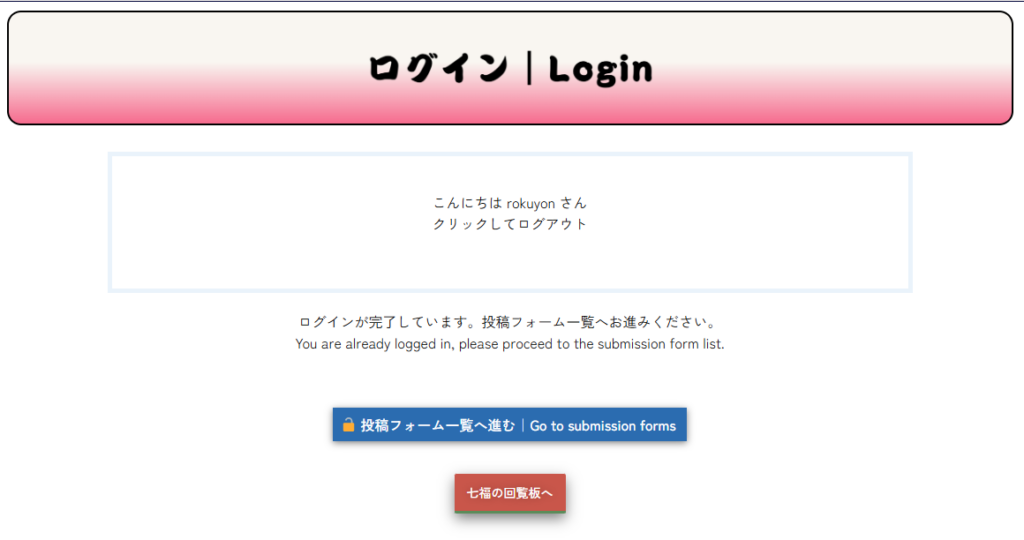
ログインが完了すると、画面の見え方が少し変わります。
右の画像を見ながら、次のようにご確認ください。
Once you are logged in, some parts of the screen will look different.
Please check the following while looking at the image on the right.
① ログイン後の画面が表示されます
The screen changes after login
ログインが完了すると、まずこの画面が表示されます。
「ログインが完了しています」と表示され、[投稿フォーム一覧へ進む] ボタンから、投稿フォーム一覧ページへ進むことができます。
After logging in, this screen will appear first.
You will see a message that your login is complete, and you can go to the submission forms page by clicking “Go to submission forms.”
② メニューのいちばん下は「投稿はこちら」だけになります
The menu changes after login
ログインしている間は、メニューのいちばん下にあった 「ログイン|Login」 は表示されなくなります。
その代わり、「投稿はこちら|Submit a Post」 だけが表示されます。
While you are logged in, “Login” will no longer appear at the bottom of the menu.
Instead, only “Submit a Post” will be shown there.
③ 「投稿はこちら」からも投稿フォーム一覧へ進めます
Go to the submission forms
ログイン中に 「投稿はこちら|Submit a Post」 をクリックすると、
投稿したい内容に合ったフォームを選ぶための案内ページが開きます。
そこから、[投稿フォーム一覧へ進む] ボタンを押して、投稿フォーム一覧ページへ進むことができます。
If you click “Submit a Post” while you are logged in,
a guidance page will open, where you can proceed to the submission forms page by clicking “Go to submission forms.”
④ 右上に「こんにちは、〇〇さん」と表示されます
Your username appears at the top right
右上の「こんにちは、〇〇さん」は、WordPressのログイン中の表示です。ここからいつでもログアウトできます。
また、サイトのメニューにある 「👤 アカウント|Account」 ページを開き、表示されている 「Logout」 からもログアウトできます。
「プロフィールを編集」も表示されますが、通常の投稿では操作する必要はありません。
“Hello, ○○” shows that you are logged in to WordPress.
You can log out from there at any time.
“Edit Profile” is also available, but you do not need to use it for normal posting.
ー背景の模様についてー
瓢箪文様(ひょうたんもんよう)は、くびれと末広がりの形が特徴的なウリ科の瓢箪を図案化した文様です。くびれが邪気を吸って逃さないとされ、魔除けとして用いられました。